
When trying to add a device (e.g. 192.168.1.1) you get the following message:
Skipping duplicate device 192.168.1.1 (duplicate of 192.168.2.53).
Generally, when this error occurs the problem is that an interface on the other device in the error message has that IP Address configured even though it is not active.
Please check the config of the “duplicate” device for the IP Address.
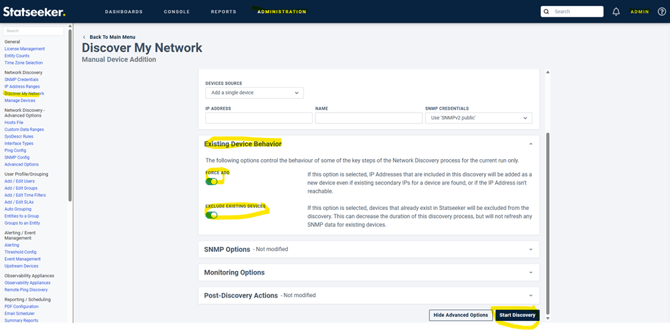
As an alternative, if you are running Statseeker 25.2 or later, you can use the "Force Add" and "Exclude Existing Devices" options in the "Existing Device Behavior" section of "Discover My Network" to add the device.
e.g.
An alternative is to check for a file with this IP address in the directory /home/statseeker/nim/etc/ipaddr
e.g.
If the file exists, then check its contents
e.g.
statseeker$ pwd
/home/statseeker/nim/etc/ipaddr
statseeker$ ls -l /home/statseeker/nim/etc/ipaddr | grep 192.168.1.1
-rw-r--r-- 1 statseeker statseeker 14 Sep 17 11:00 192.168.1.1
statseeker$ cat /home/statseeker/nim/etc/ipaddr/192.168.1.1
192.168.2.53
If the timestamp is old and you no longer have a device with this address in your network then I suggest moving the file to /tmp where it will be deleted on reboot and then add the new device.
e.g.
mv /home/statseeker/nim/etc/ipaddr/192.168.1.1 /tmp
If the address is valid on the other device you can add the new one for only ping up/down monitoring (a ping only device) but not SNMP.
To get SNMP going with two devices with the same IP address you can try configuring the device with SNMP views that don't allow statseeker to see the IP-MIB on the new device.
If Statseeker cannot get the IP table from the new device, it should then pass the duplicate check.