Statseeker SCS - Extension - System Uptime
Standard Statseeker device alerting is based on the ability to ping the device from Statseeker.
While this is effective, it doesn't catch all device problems, and can also flag devices as down that are actually up due to intermediate device failures.
This script checks either the sysUpTime or the snmpEngineTime value of devices to see if the uptime has been reset since the previous check.
Doing this will catch device reboots and show some device problems that may be missed or masked by standard ping tests.
If a reboot is detected, an event will be created called 'reboot_detected'.
This event can be used to trigger email alerts in the same way as a 'ping_state' event.
The sysUpTime counter is a 32bit value.
It's maximum value is 497 days.
Devices with an uptime greater than 497 days will have discrepancies between the shown uptime and the actual uptime.
sysUpTime is accurate to 1/100th of a second.
The snmpEngineTime is also a 32bit value, but its accuracy is in 1 second increments, instead of a 100th of a second, therefore its counter will not wrap as quickly.
It will wrap after 136 years of uptime.
snmpEngineTime is used in preference to sysUpTime.
By default, the scs-sysuptime script will poll devices every 60 seconds to check for changes in uptime. The interval can be configured via:
/home/statseeker/scs/scs_sysuptime/scs_uptime.cfg
Set the following variable to your desired interval:
SCS_UPTIME_POLLFREQ=60This SCS package may be removed when a software upgrade is applied if the functionality is now part of the product, or is no longer supported.
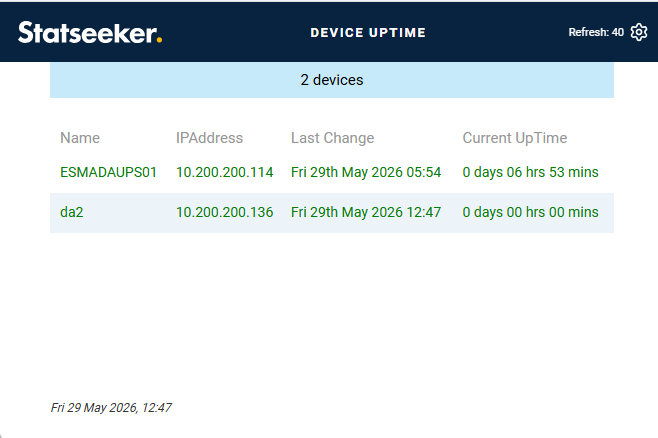
An example report is below: